.png)

Select Dataset

Open XLAssist

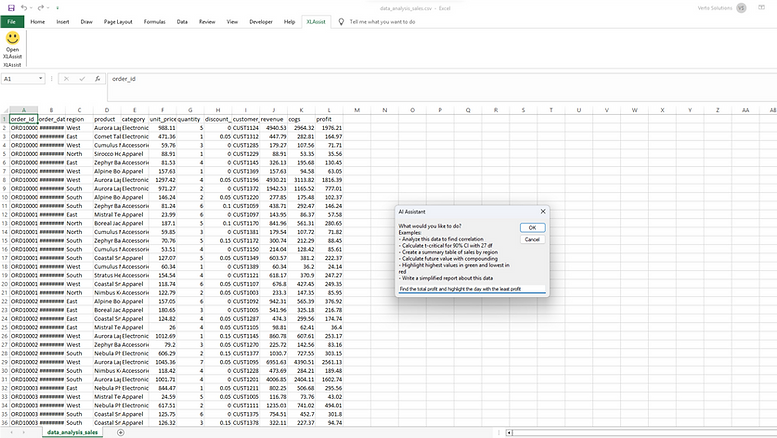
Tell it What to Do
.png)
How it works
From selection to results in seconds. No complex menus, no formulas to remember.
01
Select Your Data
Highlight any dataset in your Excel spreadsheet that you want to work with.
02
Open XLAssist
Click the XLAssist button in your Excel ribbon. The AI assistant panel opens right inside Excel - no switching apps needed.
03
Tell It What to Do
Type what you want in plain English. 'Find total profit', 'Find the most popular product' - XLAssist understands.
04
Get Results Instantly
XLAssist executes your request immediately. Your data is transformed, formulas are created, or analysis is complete in seconds.
Who is it for?
XLAssist is designed for everyone who uses Excel, regardless of skill level.
Business Professionals
Automate repetitive tasks, create reports faster, and focus on what matters.

Data Analysts
Speed up data cleaning, transformation, and analysis with natural language commands.

Students & Educators
Learn Excel faster by asking questions and seeing how formulas work.

Anyone Using Excel
No expertise required. If you can describe what you want, XLAssist can do it.

Choose your XLAssist
- NEW | BEST OFFER
XLAssist PRO
9.99$Every monthAll-in-one Excel Add-In that is capable of solving any task - from automatic formula input, to complex calculations, reports and working across worksheets & workbooks- For Daily Excel users, analysts, business owners.
- All benefits of lower plans
- Automated context recognition
- Large Data Inputs
- Automatic Formula Input & Calculation
- Steps Breakdown
- Automatic Formatting based of description
- 60x Process optimization
XLAssist Basic
3.99$Every monthAll-in-one Excel Add-In that is capable of solving any task - from automatic formula input, to complex calculations, reports and working across worksheets & workbooks- Best for students, casual Excel users, individuals
- 1,000 tasks/month
- Formula builder
- Basic reports
- Explanation mode
- Email support
Easy Installation
Get started in minutes. Works on both Windows and Mac.

Windows
Mac


Step 1
Step 2
Step 3
Step 4
Download the ZIP
Download the ZIP archive and get your license key after you purchased the plan
Extract the .xlam file
Unzip and locate XLAssist.xlam add-in file
Install in Excel
In Excel, go to File - Options - Add-Ins - Manage Add-Ins - Browse.
Make sure macros are enabled.
Start Using
Find XLAssist.xlam in your ribbon and start using
*XLAssist uses AI to help analyze, transform, and automate spreadsheet tasks, including generating formulas and simple reports. Results may be inaccurate or incomplete. Always review and verify outputs before relying on them.